
Sorry the delay, I dont have much time to play. Did what u said and worked today! Thanks bro
- Welcome, Guest. Please login.
MX Bikes Official Forum
 Show posts
This section allows you to view all posts made by this member. Note that you can only see posts made in areas you currently have access to.
2
Bug Reports / Cant Go Online anymore
March 16, 2023, 01:14:44 AM
Hi guys!
Since update 16 I only can race online in 1 of 15 times...
Anytime is something different... Dont know what to do anymore. I have everything updated.
Any help would be amazing. I am not good with those computer terms and skills.
Thanks
Since update 16 I only can race online in 1 of 15 times...
Anytime is something different... Dont know what to do anymore. I have everything updated.
Any help would be amazing. I am not good with those computer terms and skills.
Thanks
3
Track Editing / Lap Timing not working - HELP
August 21, 2021, 10:08:27 PM
Hi guys, I am creating my first track and having some problems with timing.
Idk what I am doing wrong but my track is timing onle the first 2 sections but not closing the whole lap... it gets the first and second section but it doesn´t close.
Any ideas??
Thanks in advance.
Idk what I am doing wrong but my track is timing onle the first 2 sections but not closing the whole lap... it gets the first and second section but it doesn´t close.
Any ideas??
Thanks in advance.
4
Paints / Re: 2021 Red Bud Monster Kawasakis
July 09, 2021, 01:50:02 PM
Looks awesome! I was creating this too haha guess I took too long!
5
Paints / Tomac/Cianciarullo USA Red Bud 2021 Skin - WIP
July 08, 2021, 08:53:11 PM
What´s up Red Buuuuuudddd!
Just to let the comunity knows that I am creating the Kawasaki USA Red Bud 2021 Skin.
Still a work in progress but I will release it soon.

Just to let the comunity knows that I am creating the Kawasaki USA Red Bud 2021 Skin.
Still a work in progress but I will release it soon.
6
Paints / KX Becks Team Skin
June 29, 2021, 08:14:20 PM
Hi guys, idk if I told yall this before but I love to create skins involving non usual motocross brands.
This time I bring the Becks Racing Team. A fiction motocross team based in this idea.
Together with Becks, I am using Vodafone, Subway, Paypal and RYOB to compose the visual.
This skin is for the KX250.
Hope yall like it!

DOWNLOAD HERE
This time I bring the Becks Racing Team. A fiction motocross team based in this idea.
Together with Becks, I am using Vodafone, Subway, Paypal and RYOB to compose the visual.
This skin is for the KX250.
Hope yall like it!
DOWNLOAD HERE
7
Paints / Re: Is it possible to get rid of these?
June 25, 2021, 10:12:02 PM
Haven´t figured out yet how to do it! Tried it 1000 times and never worked.
If anyone could explain it with more details I would be very thankfull.
If anyone could explain it with more details I would be very thankfull.
8
Bikes / Re: TEAM PROVEN MOTO IS LOOKING FOR A CONTENT CREATOR!
June 25, 2021, 09:56:07 PM
Why I never saw someone here advertising an opportunity to paid me while I do nothing? It is ALWAYS the opposite... this world is so cruel!
11
Track Editing / Re: TFC's Replica Track Creation Tutorial Series
February 12, 2021, 05:56:18 AMQuote from: ros on February 10, 2021, 06:13:25 PMQuote from: felipevonzuben on January 11, 2021, 02:29:06 AMQuote from: SD | NSG Sherco on January 11, 2021, 12:56:39 AMQuote from: felipevonzuben on January 11, 2021, 12:24:19 AMHi guys!
I finished the second part of the tutorial but when I load my track into the game, it has a huge clif in the middle of the map, like a huge step from one half to another... I did it again from the begining 3x and still getting the same.
Any ideias of what the heck is happening?
Thanks!
I would guess that it is to do with your heightmap, maybe the data you are collecting is off and therefore is producing a different terrain than desired. I am not an expert but this is my opinion
Yeah I was thinking about it too, but I changed the heightmap to a complete new one and things got even worse!
I am lost!
Hi !
I had the same issue when I used image encoded as RGB on 8 bits. You need to convert it to grayscale 16 bits image.
You can do it using Gimp menu:
Image -> Mode -> Grayscale
Image -> Precision -> 16bits

YEEAAAHH!!! You are right!!! You solve my problem bud! Thank's a lot!
12
Tracks / Re: [NEW 15-01-2020] Ruubs' track warehouse - 2021 Supercross Rd. 1 Houston 1 - RELEASE
February 04, 2021, 05:36:05 AMQuote from: iNsane on February 04, 2021, 02:11:59 AMThe aerial guys are currently doing all the 2021 tracks for their series.
https://mxb-mods.com/?s=Aerial
Cool! Didn't know that! Tnks
13
Tracks / Re: [NEW 15-01-2020] Ruubs' track warehouse - 2021 Supercross Rd. 1 Houston 1 - RELEASE
February 04, 2021, 01:34:55 AM
Not to put any kind of pressure on creators... my question come from someone who likes a lot 2021 Houston 1...
Are we going to have the others tracks from this season? Again, don´t get me wrong... this is not a pressure question
Are we going to have the others tracks from this season? Again, don´t get me wrong... this is not a pressure question
15
Paints / THOR STAR YAMAHA 2021 KIT
January 22, 2021, 05:57:37 AM
Hi guys! I am back, now to present my first replica.
Star Yamaha has showed a lot of Thor kits so far but the main one is this one.
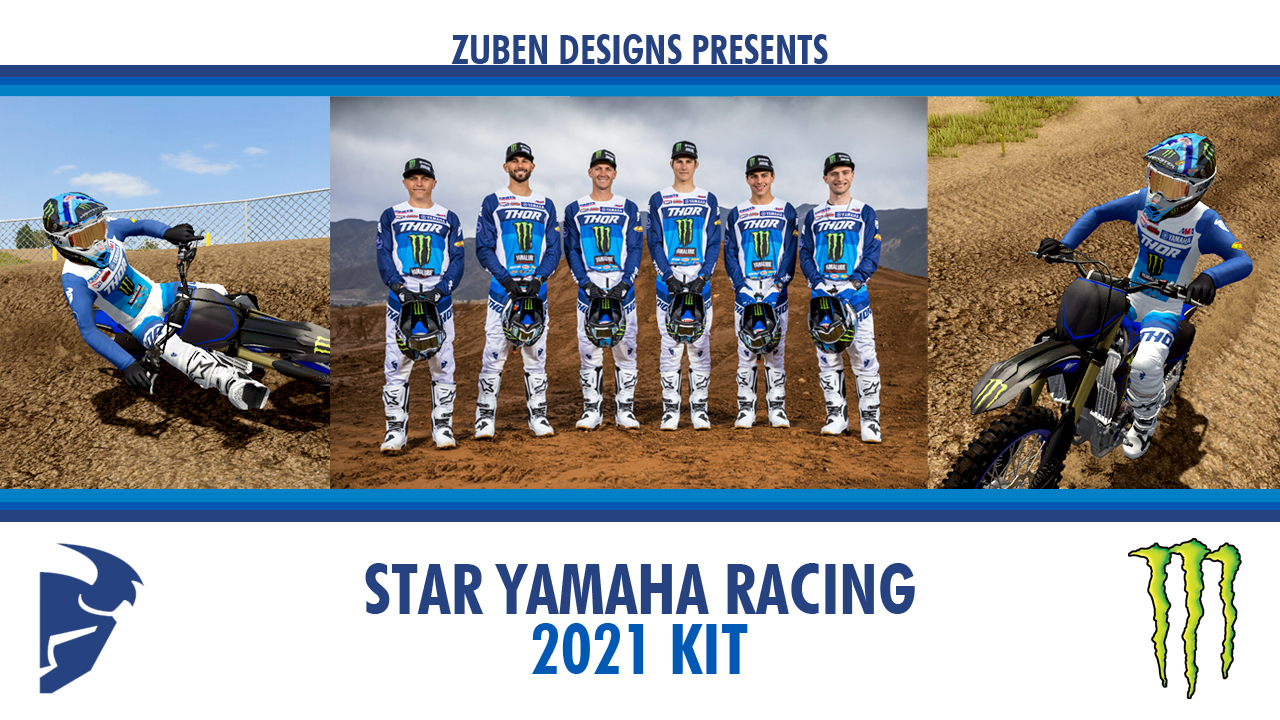
So here is my replica. Hope you guys like it!
:DOWNLOAD:
>> Helmets and Boots <<
Bell Helmets by StoneRider
Alpinestar Boots by Giopanda
Star Yamaha has showed a lot of Thor kits so far but the main one is this one.
So here is my replica. Hope you guys like it!
:DOWNLOAD:
>> Helmets and Boots <<
Bell Helmets by StoneRider
Alpinestar Boots by Giopanda