• Welcome, Guest. Please login.
 
June 17, 2026, 04:12:31 PM

News:

MX Bikes beta19 available! :)


Show posts

This section allows you to view all posts made by this member. Note that you can only see posts made in areas you currently have access to.

Messages - MUD

1
size_x = 936.3456
size_z = 234.0864
scale = 30

In Mapview & Tracked only shows left half of map in surface mode
and right half is discolored in materials mode

In 3d mode in mapview,Tracked, and ingame only renders when looking in a certain direction.
2
This is a really fun little track, the offset berms are really fun, and the whole track flows really really well after a couple laps, real 250f friendly. ;D


The tiny double (after the whoops with the turn in it and before the booter to table top) the inside of the turn Before and after could use a little a bit of a rut or a line, just looks a little blank there. Mostly before though.

Some spots/sections need smoothing(especially the 2 bigger whoops)

The environment could use somethings like Volcano/mountain, ocean, beach, river/stream, bridge, waterfall, jungle

In the 3rd person view the finish line banner seems a bit low.
3
re-reference the new file in the program or
save the desired file with a new name and re-reference it or
Sometimes you have to manually delete the texture file through the editor, then replace it with the new one.
Other times you'll have to MANUALLY copy the entire model wireframe and add the new texture file(s)

3Dmax references a lot of internally saved files. After a while it just assumes you're referencing the same unedited file and you have to create a new file to reference the edited file, It's been an issue for a longtime. If you're not careful it'll go ballistic and turn into the Terminator.
4
Maybe it needs to simulate a larger amount of force absorbed by the ground?

Force it takes to bend parts like the wheels, suspensions, and frame and the force it takes for it to return to it's original shape?

I don't think anyone's computer could handle all that in real time, but something really pre-calculated might work?
5
Quote from: Mace-x on May 09, 2016, 03:02:39 PM
Fats, i have a issue with l3dt.
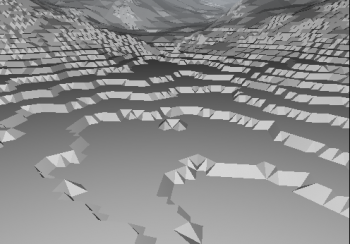
if i import my heightmap.raw it doesnt read it right, when i convert it to .png i can import it and work on it but it´s stepped like this.


Any tips?
to export it is fine, works great.
i´m digging the terramodeling tools, if it had a better viewport performance would be a great program.

I looked at the L3DT forums and found this
http://www.bundysoft.com/phpBB2/viewtopic.php?t=793

and this
http://www.bundysoft.com/docs/doku.php?id=l3dt:formats:specs:raw#mode


It says "In the Export Wizard you should press options, and set it to RAW and 16-bit unsigned (full range)"


I've never used the program though, so I can't be of much help.
6
Tracks / Re: "The Ridge v0.5" Free-Ride
May 09, 2016, 08:22:32 AM
I like this trail, so tight ;D

I'll try and give some help on texturing and material layers

First The base layer doesn't need a thickness, all layers on top of it do.
All textures and masks must be a power of 2.

To create a mask it must be set to 8bit colours and saved as a 32bit image and should be a '.TGA'
you need to add an alpha layer
needs to be in greyscale

The RGB layers are completely ignored.
The Alpha Layer is the only one used

White = 100%, Black = 0%

For textures it affects the transparency/opacity (White = Visible, Black = Invisible)

For material layers it affects the thickness ( a layer with a thickness of 1.0 metre and the mask at 75% grey would make that area 0.75 metres thick)


Here's some sample code to help out.


Track.hmf
num_layers = 4

layer0
{
map = dirt_dark.tga
repetitions = 32
}

layer1
{
map = dirt_light.tga
repetitions = 32
thickness = 0.03
}


layer2
{
map = grass.tga
repetitions = 64
mask = mask_grass.tga
thickness = 0.01
}

layer3
{
map = asphalt.tga
repetitions = 32
mask = mask_asphalt.tga
thickness = 0.25
}


Track.tht
num_material_layers = 4

material_layer0
{
material = compact soil
}

material_layer1
{
material = soil
thickness = 0.10
}

material_layer2
{
material = sand
mask = mask_sand.tga
thickness = 10
}

material_layer3
{
material = asphalt
mask = mask_asphalt.tga
thickness = 0.25
}


Layer0 is the bottom and each layer after is on top of the previous.

For materials a few of the choices are: compact soil, soil, soft soil, sand, gravel, and asphalt. I think there are 5 or 10 others too.

Hope this helps.
7
Suggestions and wishlist / Re: Bail feature
April 01, 2016, 11:22:41 AM
Big Kahuna Dumpster! ;D
8
Bug Reports / Suspension Rebound Glitch
March 28, 2016, 05:15:15 PM
Main problem in Beta 4 is when landing;

When landing The front end has a tendency to hit the ground and shoot back up at an extreme rate

When landing on a downhill it's not entirely noticeable

Landing flat it's kinda' noticeable

But when landing near an uphill or on an uphill it's really visible

The bigger the jump and the harder the hit the more it does this

If the bike was under full power and the rider wasn't pushing the front end down when this happened it would seem plausible.
However, even when the motor is at mid-power/idle/shut-off or when the rear brake is fully locked up this still happens


https://www.youtube.com/v/BjnqrQVGqbI

It's kinda' like those mexican lowridin' pimpmobiles with the super powered hydraulic suspension

I'm not entirely sure what's causin' this, but it really kills the flow through an SX style rhythm section
9
Media / Re: SSOTW #4 Voting
March 27, 2016, 11:28:24 AM
Mace-x
10
That would make testing camera positions for track making a whole lot smoother.
11
Media / Re: SSOTW #3 Voting
March 17, 2016, 12:28:58 PM
rc4187
12
Bikes / Re: 09 CRF 250, 450 MX & SM
March 17, 2016, 12:24:58 PM
I noticed on the 450mx the pipe hits the rear wheel when compressing (did't check the others though)

Otherwise, great job I really like these bikes.
13
Track Editing / Re: SuperMoto Track Building
March 13, 2016, 09:58:16 AM
I just tested it out and the asphalt works as a layer in the .tht file, the other hard surfaces might work too.
14
Track Editing / Re: SuperMoto Track Building
March 13, 2016, 09:27:52 AM
I found the problems

The problem files should read as follows

track.hmf
samples_x = 2049
samples_z = 2049

data = heightmap.raw

size_x = 437.388
size_z = 437.388
scale = 90

num_layers = 1
layer0
{
map = maps/dirt.tga
repetitions = 50
}


track.tht
samples_x = 2049
samples_z = 2049

data = heightmap.raw

size_x = 437.388
size_z = 437.388
scale = 90

num_material_layers = 1

material_layer0
{
material = soil
}


trh.bat
terrained.exe track.tht Infineon/Infineon.trh trh_params.ini

Also Infineon.tcl needs to be in the final folder
and you need to close the Track Center Line

Some times it won't close, so you need to add an extra final curved segment that ends near the first straight segment and hit close. If you zoom in, you can clearly see this.

Save the centerline
Merge the centerline
Add all the Race Definition info
Save the .RDF

and finally save the .TRH

That should at least get the track in game.

As far as the Asphalt, I'll look into, was kinda' wonderin' about it myself too.


You can also put both .bat into a single .bat file, on separate lines for simpler compiling.
15
Bug Reports / Re: Beta 4 - Runtime error
March 11, 2016, 04:31:06 AM
When riding on a 40972 track it crashes a lot quicker than on a 20492 track, (Could be the pixels/mètre or just the shear size of the terrain data)